
How to set up a Hard Luck / Second Chance division
This setup allows you to send the loser of selected matches into a separate Hard Luck, Second Chance, Redemption, or Resurrection division.
You can choose between two different methods:
- Automatic: the loser is sent directly into the Hard Luck division as soon as the match is completed.
- Player choice: the eligible loser gets a Register button in the CompuSport app and chooses whether to join the Hard Luck division.
Important: These are two different modes. If you want the player to be added automatically, leave the Must scan to send loser to auto-division for loser option unchecked. If you want the player to choose by using the app Register button, that option must be checked.
Before you begin
Create the division that will receive the players first. For example, create a division named Hard Luck, Second Chance, Redemption, or Resurrection.
You can create a bracket for that division as well, but do not shuffle/fill the Hard Luck bracket too early. Players still need to be added to the target division before the Hard Luck bracket is finalized.
Option 1 – Automatically send losers directly into the Hard Luck division
- Go to Menu > Manage > Brackets/Round-Robin > Bracket Lines and Race to.
- Select the main bracket.
- Select the round/line where the loser should become eligible for the Hard Luck division.
- Click the Pencil to edit.
- Under Auto division for Loser, select your Hard Luck / Second Chance division.
- Leave Must scan to send loser to auto-division for loser unchecked.
- Save.
Repeat these steps for every round where the loser should be sent to the Hard Luck division.
When a match from one of those configured rounds is completed, the loser will be automatically registered into the selected division. No scan or player action is required.

For automatic registration: choose the Auto division for Loser, but leave the Must Scan option unchecked.
Option 2 – Let eligible players register from the CompuSport app
Use this option when you do not want every loser automatically entered. Instead, the eligible player can decide whether to join the Hard Luck division.
Step 1 – Require registration for the loser division
- Go to Menu > Manage > Brackets/Round-Robin > Bracket Lines and Race to.
- Select the main bracket and the round where losers can enter the Hard Luck division.
- Click the Pencil.
- Choose the Hard Luck division under Auto division for Loser.
- Check Must scan to send loser to auto-division for loser.
- Save.
This changes the setup from automatic placement to a registration action for the eligible loser.
Step 2 – Turn on the Register button in the app
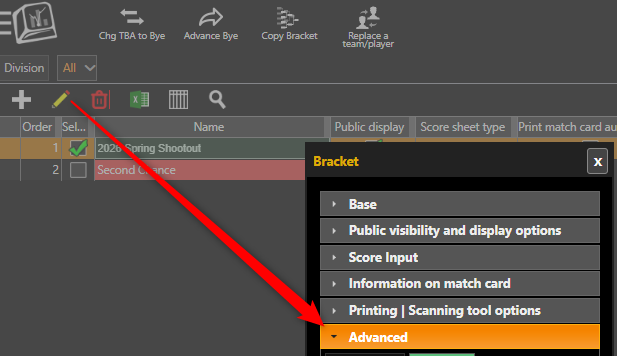
- Go to Menu > Manage > Brackets/Round-Robin > Brackets.
- Select the main bracket.
- Click the Pencil to edit.
- Open the Advanced section.
- Check Add a button to allow players to register to hard luck.
- Save.
What the player sees
After the eligible match is completed, the loser can open the match details in the CompuSport app. If they are eligible, a Register button appears for the Hard Luck / Second Chance division.

The player simply clicks Register to be added to the target division.
Important reminders
- The Auto division for Loser determines which division receives the eligible loser.
- Must scan unchecked = automatic registration.
- Must scan checked + Allow players to register to hard luck = player chooses using the app Register button.
- The Register button only appears when the player is eligible.
- Do not finalize/shuffle the Hard Luck bracket before the players who should enter it have been registered.
- If different rounds feed different Hard Luck divisions, configure each applicable round separately.
Example
You have a main Singles bracket and a Second Chance division. You want players who lose in the first two rounds to be eligible for Second Chance.
Configure those rounds with Auto division for Loser = Second Chance.
If you leave Must scan unchecked, every eligible loser is automatically added to Second Chance. If you check Must scan and enable the Hard Luck Register button on the main bracket, the player decides whether to enter by clicking Register in the app.