
How to Use the Match Fee Cross Grid and Export It to Excel
The Match Fee Cross grid is part of the League Fee Payment feature. It gives you a quick overview of your league's match fees, making it easier to review and keep track of fees throughout the season.
Find the Match Fee Cross Grid
- Log in to your CompuSport account.
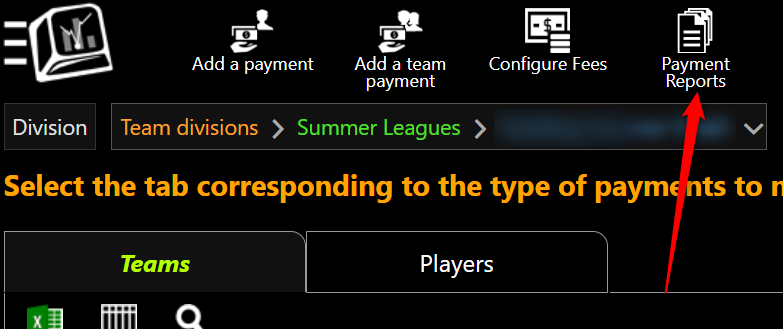
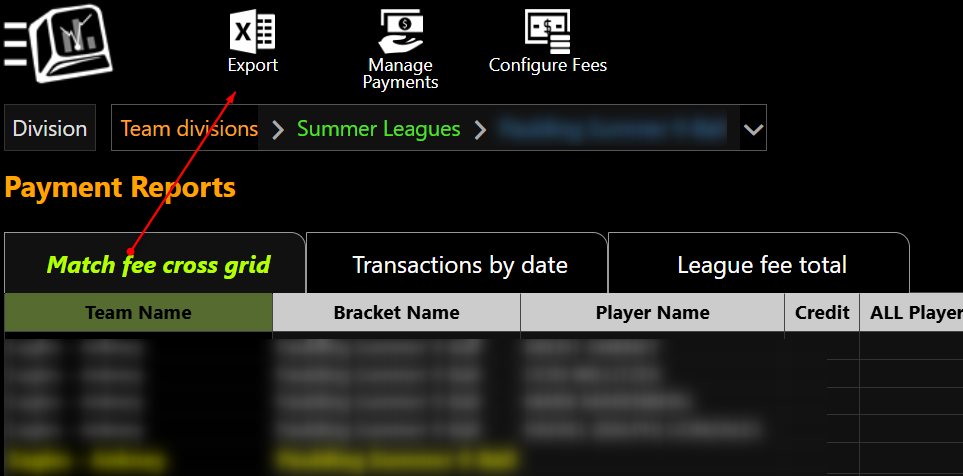
- Go to Menu > Manage > Event Fees > Manage Payments > Payment Reports Choose Match Fee Cross grid.
- Select the division you want to review.
The grid will display your match fee information in a cross-grid format, allowing you to quickly review the fees associated with your teams and matches.
This can be especially useful when you want to see the overall status of your league fees without opening each team or player individually.
Export the Match Fee Cross Grid to Excel
You can also export the information from the Match Fee Cross grid to Excel.
- Set up the grid with the division and information you want to review.
- Click the Export to Excel icon located above the grid.
- CompuSport will download the information into an Excel file.
- Open the downloaded file in Excel to sort, filter, calculate totals, or save the information for your records.