
You want to use the CSR to handicap your league?
How is the CSR used to handicap a league
Under Menu > Manage > Brackets/Round-Robin > Round Robins.
Choose your Round-Robin (League)
Pencil to edit.
Go to Score Input Section.
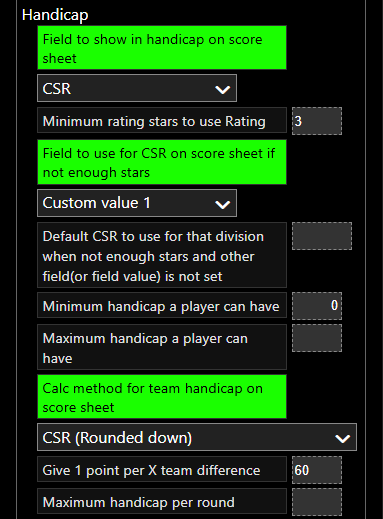
1. Field to show in handicap: Under Handicap section, choose the CSR as your player handicap.
2. Minimum rating stars: Choose the minimum rating stars
(PLEASE NOTE, that CompuSport will NOT show CSR lower than 3.5. If you choose to put anything lower. The setting will bypass to our 3.5)
3. Field to use for handicap if not enough stars: While the CSR is not accurate, you can choose to insert a CSR in a Custom Value column as a CSR until they get an accurate CSR. (Choose the Custom Value you chose to write the CSR you manually inserted in the meantime)
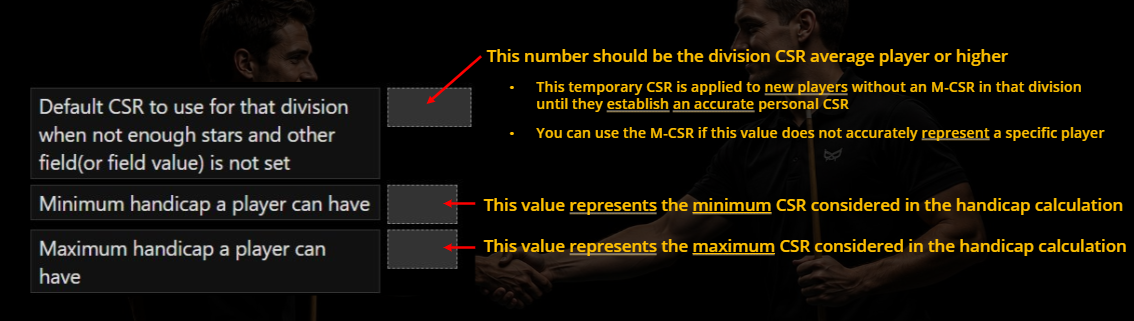
4. Set your Default CSR to use for players who don't have a CSR yet, that nothing is written in the Custom Value column.
5. Calculate method for team handicap on scoresheet: Put CSR or CSR (Rounded down):
*CSR (Rounded down) means that if a team has 119 point difference, the system will give 1 point. Because you don't have your full 120 to give 2 points.
6. Give 1 point per X pts team difference. We recommend putting 60.
(60 was tested with over 300 000 match results and this gives a 50/50 chance of winning)
So for every 60 pts difference, you give 1 handicap point to the other team.
So 120 pts difference would give 2 pts.
-Some operators choose to use 70,80 or 90 to give stronger teams better odds of winning.
Recap – How the System Chooses CSR
Does the player have 3.5 stars or more?
✅ Yes → System uses the CSR.
❌ No → System checks the Custom Value column.
Is there a Custom Value in the player's column ?
✅ Yes → System uses that manually entered CSR in Custom Value.
❌ No → System uses the Default CSR for the division.
M-CSR can also be used but this one overrides all at all times no matter if the CSR is accurate or not. This can be used for suspected sandbaggers, for a master in a league, equivalent to the Fix Handicap (use not matter what this players ends up being). M-CSR doesn't need to be set anywhere. If there is something in the M-CSR column, it will overrides all settings.